If you want to dominate in Free Fire 2026, mastering ff headshot sensitivity is essential. This determines how smooth and accurate your aim is, allowing you to land those satisfying one-tap headshots. With perfect sensitivity settings, you can instantly eliminate opponents, improve reaction time, and gain a real advantage over competitors.
In this 2026 guide, we’ll explore the best ff headshot sensitivity settings for close, medium, and long-range battles, plus settings optimized for both low-end and high-end devices.
What Is Sensitivity in Free Fire and Why It Matters
Sensitivity settings in Free Fire Max define how responsive your aim and camera movements are. While the default setup is balanced, it may not suit your device or playstyle due to:
Poor touchscreen response
Low game or device performance
Touchscreen control limitations
Optimizing ff headshot sensitivity gives smoother aim control so you can hit precise headshots consistently.
Best FF Headshot Sensitivity for Close-Range One-Taps
In close combat, every millisecond counts. High sensitivity on Red Dot makes headshots with MP40 or M1887 easier. For automatic weapons, keep 2x and 4x scope sensitivity slightly lower for stability.
For medium range, balance speed with accuracy. Slightly lower scope sensitivity avoids overshooting while keeping General and Red Dot high for target tracking.
Recommended Values:
Setting Parameter
Value
General
100
Red Dot
80
2X Scope
70
4X Scope
60
Sniper Scope
50
Free Look
57
Best FF Headshot Sensitivity for Long-Range Shots
At long range, precision matters more than speed. Lower scope sensitivity allows for micro-adjustments, especially when sniping stationary targets.
Recommended Values:
Setting Parameter
Value
General
100
Red Dot
80
2X Scope
70
4X Scope
60
Sniper Scope
50 – 53
Free Look
56 – 58
Best 2026 Sensitivity for Low-End Devices
On devices with low RAM, lag can delay aim movement. Higher sensitivity compensates for delays, but not to the point of losing accuracy.
On modern high-performance devices, you can maintain high General sensitivity but lower scope sensitivity for more precise aiming.
Recommended Values:
Setting Parameter
Value
General
80 – 100
Red Dot
50 – 55
2X Scope
80
4X Scope
75 – 80
Sniper Scope
10 – 20
Free Look
50
How to Change Sensitivity in Free Fire
On the main screen, tap the gear icon.
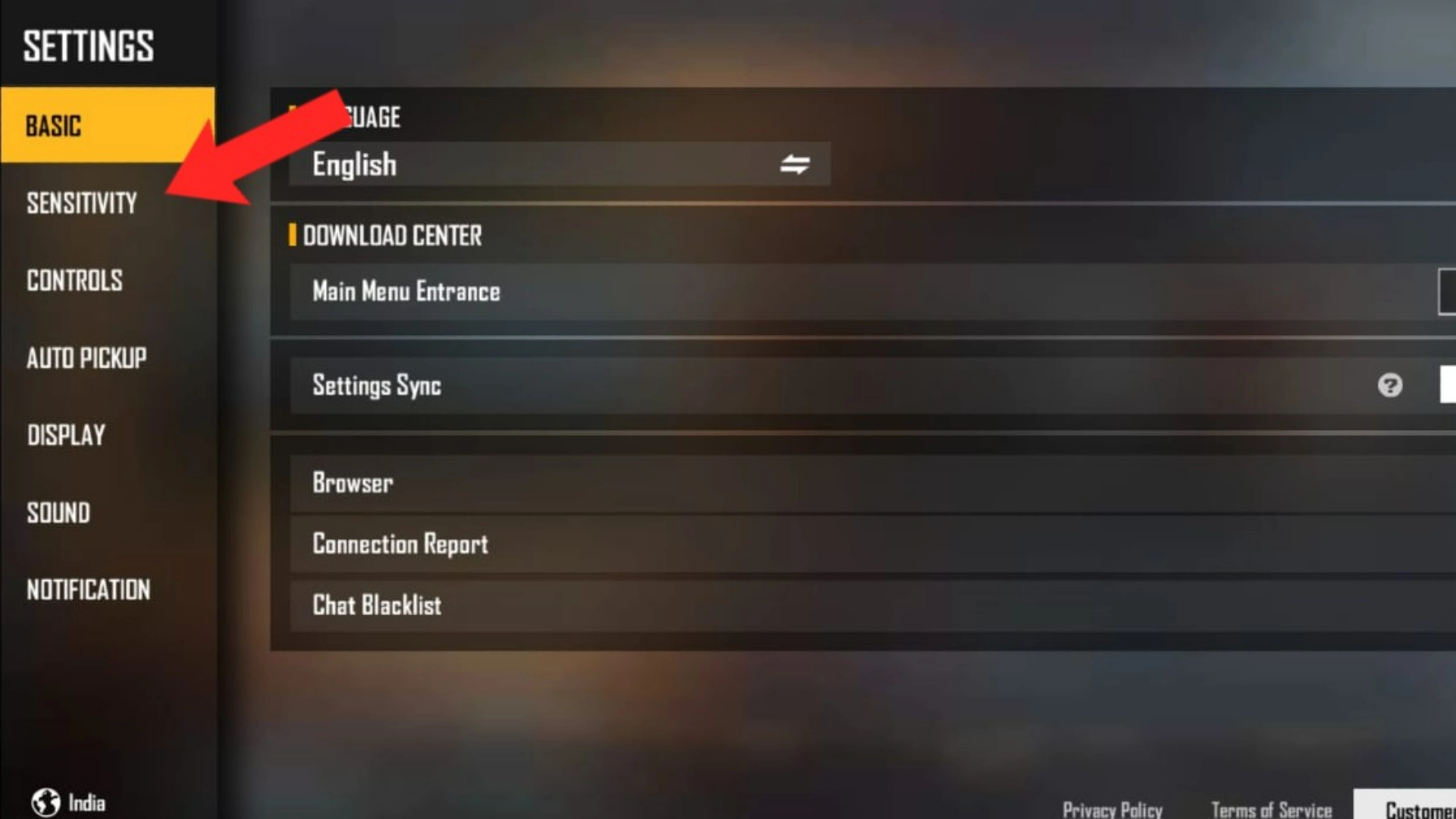
Go to the Sensitivity tab.
Adjust the sliders for all categories.
Exit — settings will save automatically.
Test in training mode, and if needed, reset to default.
Conclusion
Finding the perfect ff headshot sensitivity is key to landing consistent one-tap headshots in Free Fire. Tweak settings to match your device performance and personal playstyle, and you’ll see immediate results in accuracy and speed.
This setup is tuned for:
✔ Fast drag headshots
✔ Smooth recoil control
✔ Close + mid range dominance
✔ Works perfectly with high refresh display of Redmi Note 13 Pro Plus
🔥 If you want MORE aggressive one-tap style:
• General: 95
• ADS: 90
• Red Dot: 60
🧠 Pro Headshot Trick:
Drag slightly up when firing.
Don’t hard pull — smooth short drag = instant headshot.
🔧 Why this works for your device
The settings are drawn from community-shared values for this exact model.
With 8 GB of RAM, the device can reliably handle higher sensitivity without too much lag or unwanted overshoot.
The DPI of around 411 offers a smooth and responsive feel without making the camera too twitchy.
📌 How to apply & fine-tune it
In the game, go to Settings → Sensitivity and set each slider as above.
Set your device DPI (via Developer Options) to ~411 or as close as possible.
Enter the training ground and test with a few weapons — try going for headshots with one-tap weapons and spray control.
If your aim consistently overshoots target heads, slightly lower the “Red Dot” or “General” by ~5 points. If you feel you’re too slow turning or tracking moving targets, increase “General” or “Red Dot” by ~5.
Once you land on a comfortable setup, stick with it for a few days to build muscle memory.
For the Itel A50 (which has lower specs compared to flagship phones), achieving a good balance between headshot accuracy and smooth gameplay in Free Fire requires dialing down the sensitivity just a bit to prevent lag or overshooting. Here’s a sensitivity setup tailored to your device:
Best Free Fire Sensitivity Settings for Itel A50 (CS Rank Headshot)
General: 85
Red Dot: 80
2× Scope: 70
4× Scope: 60
Sniper Scope: 50
Free Look: 60
Tips for Headshots and Smooth Gameplay:
Graphics: Set to Smooth for better FPS stability.
FPS: Enable High FPS mode (if available) to improve your overall performance.
Sensitivity Adjustments: Since the Itel A50 has modest specs, don’t go for too fast settings — smaller, controlled movements are key for headshots.
Play Style: Practice short drag motions for headshots rather than large swipes, especially in close combat.
Recommended Sensitivity for Samsung Galaxy A30:
• General: 95–100
Gives you the freedom to snap onto targets quickly during rushes or sudden encounters.
• Red Dot: 85–90
Keeps close- to mid-range fights crisp, helping the crosshair settle right where the head tends to be.
• 2× Scope: 75–85
A balance that lets you track movement smoothly without your aim jumping too far
• 4× Scope: 70–80
Ideal for stable duels at medium distance — enough glide to follow enemies, not so much that you lose control.
• Sniper Scope: 55–65
For those slower, more deliberate shots where precision matters more than speed.
• Free Look: 85–95
Makes rotating your view feel natural and fluid, especially while running or scanning surroundings.
If you want, I can refine these even further — just tell me your playstyle (rush, balanced, long-range) or whether you use a finger sleeve, gyro, or specific DPI.
The Vivo T4x is a solid budget phone with decent performance, especially for casual gaming. It has a MediaTek Dimensity 700 chipset and a 90Hz refresh rate, which provides smooth gameplay, but you may need to adjust your settings to ensure good performance and control in Free Fire.
Here are some recommended Free Fire sensitivity settings tailored for the Vivo T4x:
Basic Sensitivity (Default)
General Sensitivity: 75-85
The Vivo T4x has a solid display, but it’s not as high-end as devices with 120Hz or more. A general sensitivity of 75-85 will provide good responsiveness without feeling too sensitive. Higher settings can result in jerky movements, while too low might make you sluggish.
Red Dot Sensitivity: 70-80
For a quick response when aiming with the red dot sight, you can set this around the middle range. This will allow you to aim smoothly and adjust your aim without feeling too stiff or jittery.
2x Scope Sensitivity: 60-70
The 2x scope is for mid-range engagements, and having the sensitivity a little lower will help with more precise aim adjustments. This ensures that you’re not overshooting or losing control while shooting at medium distances.
4x Scope Sensitivity: 50-60
When using a 4x scope for long-range combat, a lower sensitivity setting will help with precise sniper shots. The Vivo T4x can handle 4x scopes but having this set a little lower will help with accuracy.
AWM Scope Sensitivity: 40-50
Sniper rifles like the AWM need a very controlled and slow aiming setting. Lower sensitivity here will help you line up long-distance shots without overshooting or jittering.
Free Look Sensitivity: 80-90
For free-look mode, a slightly higher sensitivity will help you scan your surroundings quickly without losing control of your character’s direction.
Advanced Sensitivity
Camera Sensitivity: 75-85
The camera sensitivity governs how fast your character’s view shifts when you swipe. For smooth movement without lag, keep this at a moderate level. The Vivo T4x can handle this fairly well, but don’t go too high or you may end up with erratic camera movement.
Firing Sensitivity: 80-90
When firing, a higher sensitivity setting allows for quicker aim adjustments. Since the Vivo T4x offers smooth gameplay, you can afford to increase this sensitivity a bit, but don’t set it too high as it might make precise firing difficult.
Additional Tips for Vivo T4x:
Optimize Performance:
Since the Vivo T4x isn’t a top-tier gaming device, consider adjusting your graphics to Low or Medium to ensure smooth gameplay. Keeping the frame rate to High or Ultra (if available) can make a big difference in responsiveness.
Test in Training Grounds:
Always test your settings in the Training Grounds before committing to them in real matches. This will help you fine-tune your sensitivity based on the actual feel of the game.
Gyroscope Support:
If the Vivo T4x supports Gyroscope, enable it for more accurate aiming, especially for long-range engagements or when using sniper rifles. The gyroscope can help with finer aim adjustments during combat.
Frame Rate and Graphics Settings for Vivo T4x:
Frame Rate: Make sure your frame rate is set to High or Ultra if the device supports it, as this will make the game run much smoother, allowing you to take full advantage of your sensitivity settings.
Graphics: Lower the graphics quality to Medium or Low for a more stable frame rate and better response time. Even though the Vivo T4x is decent for gaming, it’s better to prioritize performance over high graphics.
Final Recommendations:
Test and Adjust: Sensitivity preferences are very personal. Adjust these settings and test them in the game, gradually increasing or lowering them based on what feels best for your playstyle.
Focus on Stability: Since the Vivo T4x might not handle ultra-high settings as smoothly as flagship devices, it’s better to focus on smoothness and consistency by balancing the sensitivity with lower graphics.
General (camera / base aim): ~98‑100
Red Dot (1× / hip‑fire / close‑range): ~90‑95
2× Scope: ~80‑85
4× Scope: ~65‑75
Sniper Scope (high zoom / long‑range): ~50‑60
Free Look / Look‑around: ~70‑80
✅ Why these values
High General and Red Dot make close‑ and mid‑range aiming quicker — great for headshot spray and reactive fights.
Lower scope sens (2× / 4× / sniper) keeps aiming stable at range — less jitter, better recoil control.
Balanced Free Look helps you scan surroundings smoothly without going overboard.












18 Comments
Sahil Nishad –
Realme GT 6 12 GB Ram free fire headsot sensi
Yasaman Ebrahimi –
For Realme GT 6 (12GB), start with General 95–100, Red Dot 80, 2X 70, 4X 60, Sniper 50 for smooth one-taps. Adjust slightly if you feel overshoot.
Venkata SivaRamakrishna –
redmi note 13 pro plus 8+8 GB RAM 256 STORAGE
FREEFIRE MAX HEADSHOT SENSI
Ayda Tajrizi –
Here is your Redmi Note 13 Pro Plus (8+8GB / 256GB) Free Fire MAX Headshot Sensitivity 🔥
🎯 Main Headshot Sensitivity (Balanced + Smooth Flick)
• General: 90
• ADS: 85
• Red Dot: 55
• 2x Scope: 45
• 4x Scope: 30
• AWM / 6x / 8x: 20
• Free Look: 90
This setup is tuned for:
✔ Fast drag headshots
✔ Smooth recoil control
✔ Close + mid range dominance
✔ Works perfectly with high refresh display of Redmi Note 13 Pro Plus
🔥 If you want MORE aggressive one-tap style:
• General: 95
• ADS: 90
• Red Dot: 60
🧠 Pro Headshot Trick:
Drag slightly up when firing.
Don’t hard pull — smooth short drag = instant headshot.
Swapan Manna –
8906404213
Shahar ali ahmed –
Perfect sensitive for realme 14x 8gb ram
Ayda Tajrizi –
🎮 Free Fire Sensitivity – realme 14x (8 GB RAM)
General: 145
Red Dot: 154
2× Scope: 153
4× Scope: 126
Sniper Scope (AWM/8×): 50
Free Look: 50
DPI: 411
🔧 Why this works for your device
The settings are drawn from community-shared values for this exact model.
With 8 GB of RAM, the device can reliably handle higher sensitivity without too much lag or unwanted overshoot.
The DPI of around 411 offers a smooth and responsive feel without making the camera too twitchy.
📌 How to apply & fine-tune it
In the game, go to Settings → Sensitivity and set each slider as above.
Set your device DPI (via Developer Options) to ~411 or as close as possible.
Enter the training ground and test with a few weapons — try going for headshots with one-tap weapons and spray control.
If your aim consistently overshoots target heads, slightly lower the “Red Dot” or “General” by ~5 points. If you feel you’re too slow turning or tracking moving targets, increase “General” or “Red Dot” by ~5.
Once you land on a comfortable setup, stick with it for a few days to build muscle memory.
A.R.U.S.991 –
Spamming
Vimal –
Itel a50 ff sensitivity cs rank headshot
Ayda Tajrizi –
For the Itel A50 (which has lower specs compared to flagship phones), achieving a good balance between headshot accuracy and smooth gameplay in Free Fire requires dialing down the sensitivity just a bit to prevent lag or overshooting. Here’s a sensitivity setup tailored to your device:
Best Free Fire Sensitivity Settings for Itel A50 (CS Rank Headshot)
General: 85
Red Dot: 80
2× Scope: 70
4× Scope: 60
Sniper Scope: 50
Free Look: 60
Tips for Headshots and Smooth Gameplay:
Graphics: Set to Smooth for better FPS stability.
FPS: Enable High FPS mode (if available) to improve your overall performance.
Sensitivity Adjustments: Since the Itel A50 has modest specs, don’t go for too fast settings — smaller, controlled movements are key for headshots.
Play Style: Practice short drag motions for headshots rather than large swipes, especially in close combat.
Gbogboadeemmanuel –
Sensitivity for Samsung Galaxy A30
Ayda Tajrizi –
Recommended Sensitivity for Samsung Galaxy A30:
• General: 95–100
Gives you the freedom to snap onto targets quickly during rushes or sudden encounters.
• Red Dot: 85–90
Keeps close- to mid-range fights crisp, helping the crosshair settle right where the head tends to be.
• 2× Scope: 75–85
A balance that lets you track movement smoothly without your aim jumping too far
• 4× Scope: 70–80
Ideal for stable duels at medium distance — enough glide to follow enemies, not so much that you lose control.
• Sniper Scope: 55–65
For those slower, more deliberate shots where precision matters more than speed.
• Free Look: 85–95
Makes rotating your view feel natural and fluid, especially while running or scanning surroundings.
If you want, I can refine these even further — just tell me your playstyle (rush, balanced, long-range) or whether you use a finger sleeve, gyro, or specific DPI.
Dhiraj –
Vivo t4x sensitivity
Ayda Tajrizi –
The Vivo T4x is a solid budget phone with decent performance, especially for casual gaming. It has a MediaTek Dimensity 700 chipset and a 90Hz refresh rate, which provides smooth gameplay, but you may need to adjust your settings to ensure good performance and control in Free Fire.
Here are some recommended Free Fire sensitivity settings tailored for the Vivo T4x:
Basic Sensitivity (Default)
General Sensitivity: 75-85
The Vivo T4x has a solid display, but it’s not as high-end as devices with 120Hz or more. A general sensitivity of 75-85 will provide good responsiveness without feeling too sensitive. Higher settings can result in jerky movements, while too low might make you sluggish.
Red Dot Sensitivity: 70-80
For a quick response when aiming with the red dot sight, you can set this around the middle range. This will allow you to aim smoothly and adjust your aim without feeling too stiff or jittery.
2x Scope Sensitivity: 60-70
The 2x scope is for mid-range engagements, and having the sensitivity a little lower will help with more precise aim adjustments. This ensures that you’re not overshooting or losing control while shooting at medium distances.
4x Scope Sensitivity: 50-60
When using a 4x scope for long-range combat, a lower sensitivity setting will help with precise sniper shots. The Vivo T4x can handle 4x scopes but having this set a little lower will help with accuracy.
AWM Scope Sensitivity: 40-50
Sniper rifles like the AWM need a very controlled and slow aiming setting. Lower sensitivity here will help you line up long-distance shots without overshooting or jittering.
Free Look Sensitivity: 80-90
For free-look mode, a slightly higher sensitivity will help you scan your surroundings quickly without losing control of your character’s direction.
Advanced Sensitivity
Camera Sensitivity: 75-85
The camera sensitivity governs how fast your character’s view shifts when you swipe. For smooth movement without lag, keep this at a moderate level. The Vivo T4x can handle this fairly well, but don’t go too high or you may end up with erratic camera movement.
Firing Sensitivity: 80-90
When firing, a higher sensitivity setting allows for quicker aim adjustments. Since the Vivo T4x offers smooth gameplay, you can afford to increase this sensitivity a bit, but don’t set it too high as it might make precise firing difficult.
Additional Tips for Vivo T4x:
Optimize Performance:
Since the Vivo T4x isn’t a top-tier gaming device, consider adjusting your graphics to Low or Medium to ensure smooth gameplay. Keeping the frame rate to High or Ultra (if available) can make a big difference in responsiveness.
Test in Training Grounds:
Always test your settings in the Training Grounds before committing to them in real matches. This will help you fine-tune your sensitivity based on the actual feel of the game.
Gyroscope Support:
If the Vivo T4x supports Gyroscope, enable it for more accurate aiming, especially for long-range engagements or when using sniper rifles. The gyroscope can help with finer aim adjustments during combat.
Frame Rate and Graphics Settings for Vivo T4x:
Frame Rate: Make sure your frame rate is set to High or Ultra if the device supports it, as this will make the game run much smoother, allowing you to take full advantage of your sensitivity settings.
Graphics: Lower the graphics quality to Medium or Low for a more stable frame rate and better response time. Even though the Vivo T4x is decent for gaming, it’s better to prioritize performance over high graphics.
Final Recommendations:
Test and Adjust: Sensitivity preferences are very personal. Adjust these settings and test them in the game, gradually increasing or lowering them based on what feels best for your playstyle.
Focus on Stability: Since the Vivo T4x might not handle ultra-high settings as smoothly as flagship devices, it’s better to focus on smoothness and consistency by balancing the sensitivity with lower graphics.
Raman Singh –
Redeem code
Dhiraj –
Vivo t4x sensitivity
Please
Ayda Tajrizi –
🎯 Suggested Sensitivity Settings for Vivo T4x
General (camera / base aim): ~98‑100
Red Dot (1× / hip‑fire / close‑range): ~90‑95
2× Scope: ~80‑85
4× Scope: ~65‑75
Sniper Scope (high zoom / long‑range): ~50‑60
Free Look / Look‑around: ~70‑80
✅ Why these values
High General and Red Dot make close‑ and mid‑range aiming quicker — great for headshot spray and reactive fights.
Lower scope sens (2× / 4× / sniper) keeps aiming stable at range — less jitter, better recoil control.
Balanced Free Look helps you scan surroundings smoothly without going overboard.
Satheesh –
Poco m6 5g 4gp ram Alto headset sensivitiy