
If this is your first time purchasing from Item4Gamer, this guide is for you!
On this page, we explain step‑by‑step how to find your desired product or service, place your order, and receive it in the shortest possible time. With this tutorial, the purchasing process will be completely clear, and you can confidently make your online purchase.
Note: All purchases made in Item4Gamer, once they’re delivered, are non-returnable, non-exchangeable, and non-refundable.
Instant Delivery products are fulfilled via digital code. This category includes various gift cards, ping reduction services, and other similar items.
Once your purchase is completed, the product code will be instantly placed in the Orders section of your account on the Item4Gamer website, ready for immediate use.
✅ These products are delivered instantly with no waiting time.
Table of contents
Purchase Steps

- Select Region Choose the country or region that matches your game or platform account. The region must match exactly for the code to work.
- Select Amount Pick the desired value from the available options (e.g., 5,5, 5,10, $25, etc.).
- Add to Cart Once you’ve selected the region and amount, click Add to cart to place the product into your shopping cart.
Check Out
At this stage, after reviewing your selected products, quantities, and the total order amount, log in to your Item4Gamer account.
If you do not yet have an account, you can create one by entering the required information.
Next, choose your preferred payment method and complete the payment to place your order.
In the following section, the order placement process will be explained step‑by‑step in more detail.
Step 1: Login to Your Account or Create a New Account
In this step, to proceed with your purchase, you must either log in to your existing account or create a new one. There are two ways to do this:

Login with Email and Password
- In the Username or email field, enter the email or username you previously registered with Item4Gamer.
- In the Password field, enter the password for that account.
- Click the Login button to sign in to your account.
Login with Google (Login with Google)
Sign in to your Google account and grant the necessary permissions to complete your login to Item4Gamer.
4.Click the Login with Google option.
If you do not have an account, you can go to the Billing section on this same page, fill in your details, and a new account will be created automatically.
Step 2: Create a New Account
If you don’t already have an Item4Gamer account, simply complete the Billing details form on this page. Your new account will be automatically created once you enter this information.

- Enter Personal Information
- First name: Your first name
- Last name: Your surname
- Country / Region: Select your country or region of residence from the dropdown menu
- Phone Number (optional): Enter your contact number if you wish
- Email address: An active email used to log in and receive order updates
2. Coupon Code (Optional)
If you have a coupon code, enter it in the Coupon field and click Apply coupon.
💡 After placing your order, you can use this email and password to log in for future purchases.
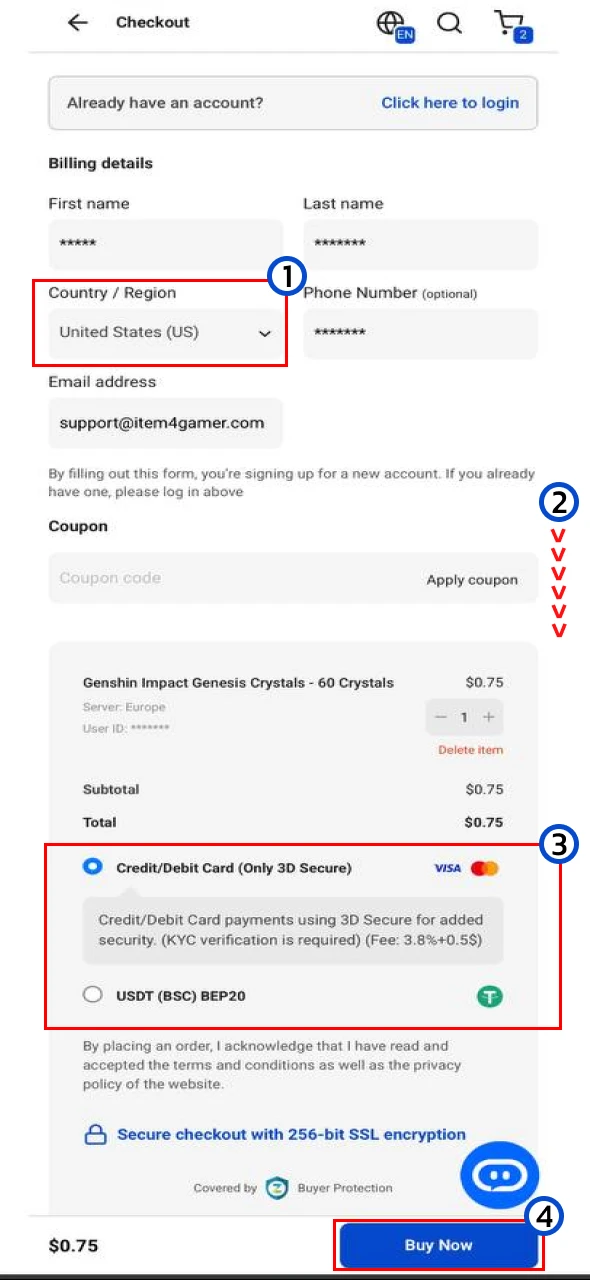
Step 3: Select Country, Payment Method, and Finalize Your Order
1. Select Country / Region
- From the Country / Region dropdown menu, select your country of residence or the country you will use for payment.
- The available payment methods will be displayed based on this selection.
2.Scroll down the page
3. Select Payment Method
Depending on the selected country, you will see the available payment methods.
Examples:
- Credit/Debit Card (Only 3D Secure) – Pay using an international bank card (KYC required)
- USDT (BSC) BEP20) – Pay using cryptocurrency Tether on the BSC network
4.After choosing your payment method, click Buy Now.
Step 5: Select the Final Payment Gateway & Complete Payment
After clicking Buy Now, you will see a list of available payment gateways for your selected country or region.
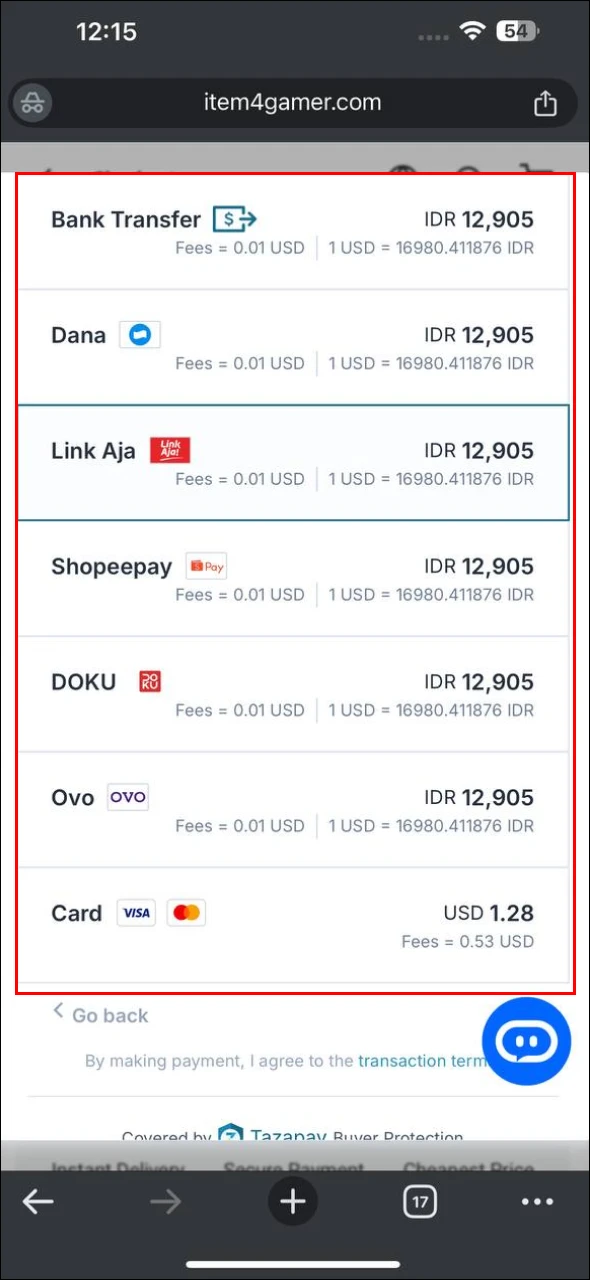
Depending on the country, you may see options like QRIS, Bank Transfer, LinkAja, DOKU, Dana, Shopeepay, Ovo, Card (Visa/Master).
Transaction fees and the final price are displayed next to each option.
Complete the Payment
Enter your payment information and confirm the transaction.
Click on your preferred option to be redirected to the payment page.
Orders Page & Code Delivery on Item4Gamer
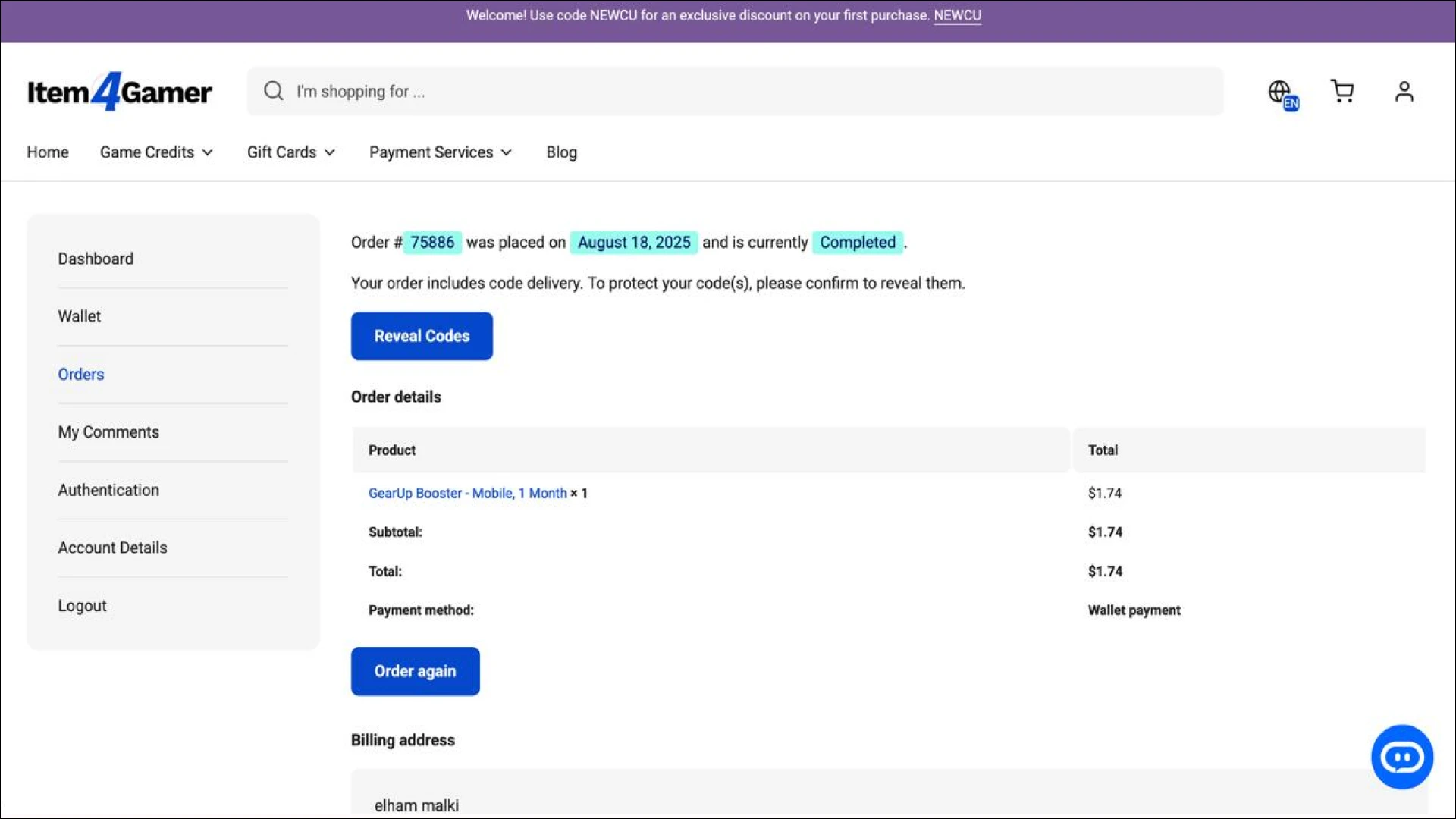
After completing your purchase, your product code will be available in the Orders section of your account.
On this page, you’ll see your order details, including the order number, date, status (e.g., Completed), purchased product, amount, and payment method.
To view your code:
Click the Reveal Codes button, then confirm by selecting Confirm & Show Codes. Your code will then be displayed.
💡 Note:
Codes are only visible here in your account’s Orders section

If you’re looking for other products, check our Manual Delivery Products and Auto Top Up Products guides.