Note: All purchases made in Item4Gamer, once they’re delivered, are non-returnable, non-exchangeable, and non-refundable.
If you’re a PUBG Mobile player looking for a fast and secure way to top up your UC, Item4Gamer (I4G) is one of the most trusted online game credit platforms.
In this guide, you’ll learn exactly how to purchase PUBG Mobile UC step‑by‑step — from selecting your package to completing payment and receiving your UC in‑game.
Note: All UC purchases on Item4Gamer are non‑refundable after delivery. Auto top‑up products (like UC, Free Fire Diamonds, and Genshin Genesis Crystals) are sent directly to your game account within 30 minutes after payment.

PUBG Mobile UC
Step 1 — Select Your UC Package
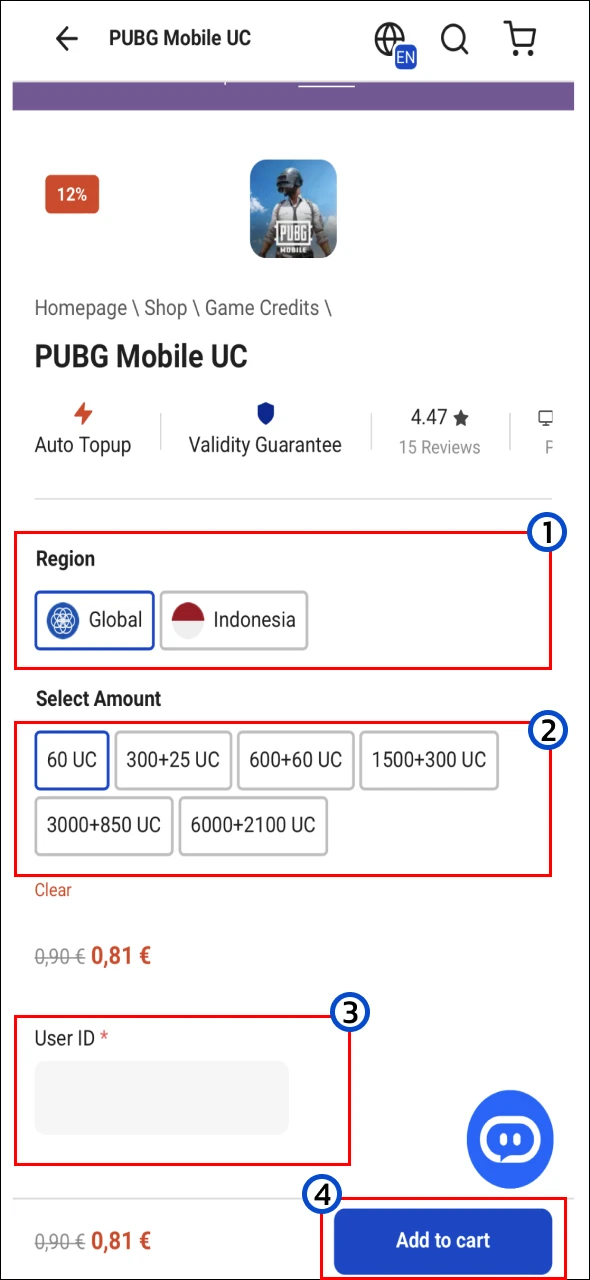
- Choose RegionSelect the correct region linked to your PUBG Mobile account (e.g., Global or Indonesia).
- Choose UC AmountPick your desired UC package (e.g., 60 UC, 600+60 UC, 1500+300 UC).
- Enter Your User IDType your PUBG Mobile UID exactly as it appears in-game.
- Add to CartClick Add to cart to proceed.
Follow us on social media and stay one step ahead of the game! 🚀






Step 2 — Log In or Create an Account

If you already have an Item4Gamer account:
- Enter your registered email/username and password, then click Login.
Or log in quickly using your Google account with Login with Google.
If you don’t have an account:
- Fill in your billing details (Step 3) and your account will be created automatically.
Step 3 — Enter Billing Details

- First name & Last name — Your real name.
- Country / Region — Select your location.
- Phone number (optional).
- Email address — Used for order updates and future logins.
- Coupon (optional) — Enter and apply any discount codes.
Click Buy Now when ready.
Step 4 — Select Payment Method

- Choose your preferred payment option based on availability in your country.
- Popular methods include Credit/Debit Card (3D Secure), USDT (Crypto), and Bank Transfer.
Step 5 — Select Final Payment Gateway
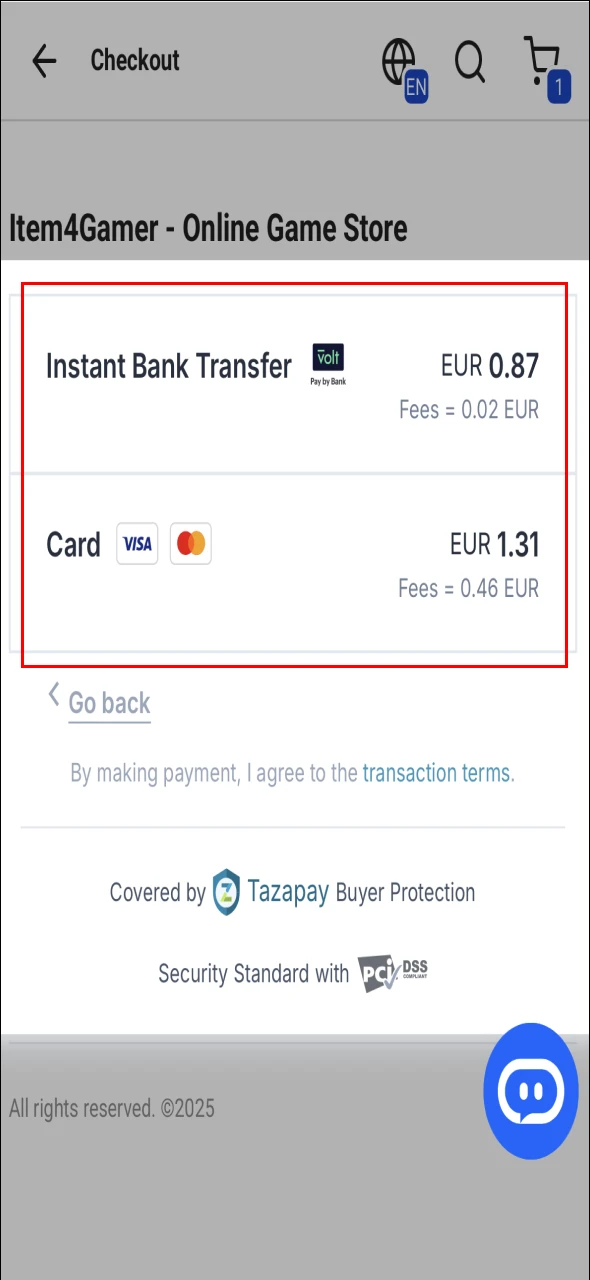
Depending on your selected payment method, choose the final gateway — e.g., Instant Bank Transfer or Visa/Mastercard.
Check the transaction fee before confirming.
Step 6 — Order Processing

- After payment, your order status will show as Processing.
- The estimated delivery time (e.g., 06:20:07) appears on the page.
UC will automatically be added to your PUBG Mobile account within this time.
Step 7 — Order Completed

- When the status changes to Completed, your UC is delivered.
- For code-based items, click Reveal Codes, confirm, and view your code.
Conclusion
Buying PUBG Mobile UC from Item4Gamer is quick, safe, and straightforward.
With instant delivery and multiple secure payment options, it’s a reliable way to top up your game account from anywhere in the world.